Ever found yourself needing to figure out how many days between two events, or how many hours until a deadline? If you’re working with Python, calculating date duration (the time between two dates or times) is way easier than you might think. In this guide, we’ll break down the most common tools and tricks to get this done—no fancy libraries required (though we’ll cover those too for trickier cases).
1. The Basics: Using Python’s Built-in datetime Module
Python comes with a datetime module right out of the box, and it’s your go-to for most date duration tasks. The star of the show here is timedelta—it represents the difference between two date or time objects.
Step 1: Create datetime Objects
First, you need two date/time points to compare. You can create them manually, or parse them from strings (we’ll cover parsing later).
from datetime import datetime

# Create two datetime objects (year, month, day, hour, minute, second)
start_date = datetime(2024, 1, 15, 10, 30, 0)
end_date = datetime(2024, 5, 20, 14, 45, 0)

print("Start:", start_date)  # Output: 2024-01-15 10:30:00
print("End:", end_date)      # Output: 2024-05-20 14:45:00
Output:

Step 2: Calculate the Duration
Subtract the earlier datetime from the later one—this gives you a timedelta object with the difference.
 from datetime import datetime

# Create two datetime objects (year, month, day, hour, minute, second)
start_date = datetime(2024, 1, 15, 10, 30, 0)
end_date = datetime(2024, 5, 20, 14, 45, 0)

print("Start:", start_date)  # Output: 2024-01-15 10:30:00
print("End:", end_date)      # Output: 2024-05-20 14:45:00

# Calculate duration (end - start = positive difference)
duration = end_date - start_date

# Print the full duration
print("Total Duration:", duration)  # Output: 125 days, 4:15:00

# Extract specific units (days, seconds, microseconds)
print("Days:", duration.days)
print("Total Seconds:", duration.total_seconds())
print("Hours:", duration.total_seconds() / 3600) 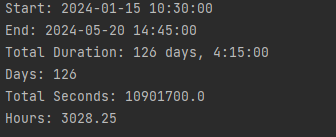
Pro tip: If you subtract a later date from an earlier one, you’ll get a negative timedelta (e.g., -5 days, 0:00:00). Just add a abs() if you only care about the absolute difference!
Step 3: Parse Dates from Strings
Most of the time, you won’t be typing dates manually—you’ll have them as strings (like "2024-01-15" or "15/01/2024"). Use datetime.strptime() to convert them.
# Parse strings into datetime objects (specify the format)
date_str1 = "2024-01-15"
date_str2 = "2024-05-20"

# Format codes: %Y = 4-digit year, %m = 2-digit month, %d = 2-digit day
parsed_date1 = datetime.strptime(date_str1, "%Y-%m-%d")
parsed_date2 = datetime.strptime(date_str2, "%Y-%m-%d")

duration = parsed_date2 - parsed_date1
print("Days between dates:", duration.days)  # Output: 126
Output:

2. Handling Trickier Cases with dateutil
The datetime module works great for simple cases, but what if you need to parse messy dates (like "Jan 15, 2024") or calculate differences in months/years? That’s where the python-dateutil library comes in—it’s a third-party tool that simplifies these tasks.
First: Install dateutil
pip install python-dateutilParse Any Date String (No Format Needed!)
dateutil.parser.parse() can guess the format of most date strings—super handy for real-world data.
from dateutil import parser

# Parse messy date strings
messy_date1 = parser.parse("Jan 15, 2024 10:30 AM")
messy_date2 = parser.parse("15/05/2024 2:45 PM")  # Works with day/month/year too!

duration = messy_date2 - messy_date1
print("Duration:", duration)  # Output: 121 days, 4:15:00
Output:

Calculate Month/Year Differences
One big limitation of timedelta is it doesn’t handle months or years (since they vary in length). relativedelta from dateutil fixes this.
 from datetime import datetime

from dateutil.relativedelta import relativedelta

start = datetime(2024, 1, 15)
end = datetime(2025, 3, 20)

# Get relative difference (months, years, days)
diff = relativedelta(end, start)

print("Years:", diff.years)    # Output: 1
print("Months:", diff.months)  # Output: 2
print("Days:", diff.days)      # Output: 5
print(f"Total: {diff.years}y {diff.months}m {diff.days}d")  # 1y 2m 5d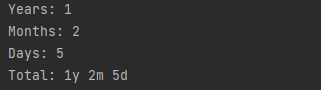
3. Practical Examples You Can Steal
Let’s put this into action with common real-world tasks.
Example 1: Days Between Two Events
Calculate how many days passed between a project start and end date.
from datetime import datetime

def days_between_dates(date_str1, date_str2, format="%Y-%m-%d"):
    date1 = datetime.strptime(date_str1, format)
    date2 = datetime.strptime(date_str2, format)
    return abs((date2 - date1).days)

# Usage
project_start = "2024-02-01"
project_end = "2024-06-15"
print(f"Project lasted {days_between_dates(project_start, project_end)} days")  # Output: 135
Output:


Example 2: Countdown to a Future Date
Show how many days/hours/minutes until a deadline (uses today’s date).
from datetime import datetime

def countdown_to_deadline(deadline_str, format="%Y-%m-%d %H:%M"):
    today = datetime.now()
    deadline = datetime.strptime(deadline_str, format)

    if deadline < today:
        return "Deadline has passed!"

    diff = deadline - today
    days = diff.days
    hours = diff.seconds // 3600
    minutes = (diff.seconds % 3600) // 60

    return f"Countdown: {days}d {hours}h {minutes}m"

# Usage
vacation = "2025-12-25 08:00"
print(countdown_to_deadline(vacation))  # e.g., "Countdown: 70d 21h 48m"
FAQ: Common Date Duration Headaches
Q: Why can’t I get months/years with timedelta?
A: Because months have 28-31 days and years have 365-366 days—Python can’t calculate a "standard" month/year difference. Use relativedelta from dateutil instead.
Q: My date string has a timezone (e.g., "2024-01-15 UTC"). How do I handle that?
A: Use datetime.strptime() with %Z for timezones, or dateutil.parser.parse() (it handles timezones automatically). For serious timezone work, check out the pytz library.
Q: How do I calculate duration for only business days (exclude weekends)?
A: You’ll need to loop through the days between the two dates and count only weekdays (Monday-Friday). Here’s a quick snippet:
from datetime import datetime, timedelta

def business_days_between(start, end):
    days = 0
    current = start
    while current < end:
        if current.weekday() < 5:  # 0=Mon, 4=Fri
            days +=1
        current += timedelta(days=1)
    return days

# Usage
start = datetime(2024, 5, 20)  # Mon
end = datetime(2024, 5, 24)    # Fri
print(business_days_between(start, end))  # Output: 4
Wrapping Up
Calculating date duration in Python is all about using the right tool for the job: use the built-in datetime and timedelta for simple date/time differences, and dateutil for messy parsing or month/year calculations. With the examples above, you should be able to handle most time-tracking tasks in your projects.
Got a specific date problem? Drop a comment and we’ll help you work through it!