Introduction
Working with dates and times is a common task in almost every Python project you'll work on. Whether you're building a web application, analyzing data, or creating a simple script, you'll often find yourself needing to convert between string representations of dates and actual datetime objects.
For a handy tool to test and experiment with different date formats while you work, check out this Date & Time Formatter – it can help you visualize how different format codes translate to readable dates.
In this guide, we'll explore everything you need to know about converting Python strings to datetime objects and then back to strings. I'll walk you through practical examples, common pitfalls, and best practices to make this process smooth and error-free.
Why Date Conversion Matters
You might be wondering why we can't just work with date strings directly. Well, strings are great for displaying dates to users, but they're not ideal for actual date calculations. For example, if you need to find the difference between two dates, compare dates, or add a certain number of days to a date, working with proper datetime objects makes these operations much simpler.
On the flip side, datetime objects aren't very user-friendly when you want to display them. That's why knowing how to convert between these two formats is essential for any Python developer.
The Python Datetime Module
Python's built-in datetime module is your best friend when working with dates and times. It provides classes for manipulating dates and times in both simple and complex ways.
For our conversion purposes, we'll primarily use:
datetime.datetime- A combination of a date and a timedatetime.strptime()- For converting strings to datetime objectsdatetime.strftime()- For converting datetime objects to strings
Let's start by importing the necessary components:
from datetime import datetimeConverting Strings to Datetime Objects
The strptime() method is used to convert a string representation of a date and time into a datetime object. The name "strptime" stands for "string parse time."
The basic syntax looks like this:
datetime_object = datetime.strptime(date_string, format_code)Understanding Format Codes
The tricky part is understanding the format codes that tell Python how to interpret your date string. Here are some of the most commonly used ones:
%Y- Four-digit year (e.g., 2023)%m- Two-digit month (01 to 12)%d- Two-digit day (01 to 31)%H- Hour in 24-hour format (00 to 23)%M- Minute (00 to 59)%S- Second (00 to 59)%a- Abbreviated weekday name (e.g., Mon)%b- Abbreviated month name (e.g., Jan)
Practical Examples: String to Datetime
Let's look at some common scenarios:
Example 1: Basic Date Format
 from datetime import datetime

# Convert "2023-10-05" to datetime object
date_string = "2023-10-05"
format_code = "%Y-%m-%d"
datetime_obj = datetime.strptime(date_string, format_code)

print(datetime_obj)  # Output: 2023-10-05 00:00:00
print(type(datetime_obj))  # Output: <class 'datetime.datetime'>
Output: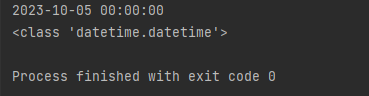
Example 2: Date with Time
 from datetime import datetime

# Convert "2023-10-05 14:30:45" to datetime object
date_string = "2023-10-05 14:30:45"
format_code = "%Y-%m-%d %H:%M:%S"
datetime_obj = datetime.strptime(date_string, format_code)

print(datetime_obj)  # Output: 2023-10-05 14:30:45
Output: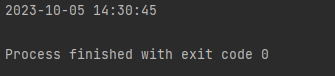
Example 3: Date with Month Name
 import datetime

date_string = "October 05, 2023"
format_code = "%B %d, %Y"
datetime_obj = datetime.datetime.strptime(date_string, format_code)

print(datetime_obj) 
Example 4: European Date Format
 import datetime

date_string = "05/10/2023"
format_code = "%d/%m/%Y"

datetime_obj = datetime.datetime.strptime(date_string, format_code)

print(datetime_obj)
Output:

Handling Errors in String to Datetime Conversion
It's common to run into errors when the format code doesn't match the date string. Always use try-except blocks to handle these situations:
date_string = "2023/10/05"
format_code = "%Y-%m-%d"

try:
    datetime_obj = datetime.strptime(date_string, format_code)
    print(datetime_obj)
except ValueError:
    print(f"Error: Could not convert '{date_string}' with format '{format_code}'")
Output:

Converting Datetime Objects to Strings
Once you've performed your date calculations, you'll often want to convert the datetime object back to a string for display. That's where the strftime() method comes in. The name stands for "string format time."
The syntax is straightforward:
date_string = datetime_object.strftime(format_code)Practical Examples: Datetime to String
Let's use the same format codes as before, but in reverse:
Example 1: Basic Date Format
 import datetime

# Method 1: Using module.class notation (keeping import datetime)
now = datetime.datetime.now()  # Correct: Call now() method from datetime class
date_string = now.strftime("%Y-%m-%d")
print(date_string)  # Example output: 2025-10-14


# Method 2: Import datetime class directly (more concise)
from datetime import datetime  # Import the class directly
now = datetime.now()  # Call now() method directly on the class
date_string = now.strftime("%Y-%m-%d")
print(date_string)  # Example output: 2025-10-14
Output:
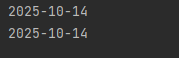
Example 2: Full Date and Time
import datetime

# Method 1: Using module.class notation
now = datetime.datetime.now()  # Correctly call now() on the datetime class
date_string = now.strftime("%B %d, %Y %I:%M %p")
print(date_string)  # Example output: October 14, 2025 03:45 PM


# Method 2: Import datetime class directly (more readable)
from datetime import datetime  # Import the class directly
now = datetime.now()  # Call now() on the imported class
date_string = now.strftime("%B %d, %Y %I:%M %p")
print(date_string)  # Example output: October 14, 2025 03:45 PM
Output

Example 3: ISO Format
now = datetime.now()

# Convert to ISO 8601 format
date_string = now.strftime("%Y-%m-%dT%H:%M:%S")
print(date_string)  # Output might be: 2023-10-05T14:45:30
The time result depends on your current time: 2025-10-14T15:45:06
Example 4: Custom Format for Logging
now = datetime.now()

# Create a string suitable for log files
log_string = now.strftime("[%Y-%m-%d %H:%M:%S]")
print(log_string)  # Output might be: [2023-10-05 14:45:30]
The time result depends on your current time: [2025-10-14 15:46:53]
Real-World Use Cases
Let's look at some practical scenarios where these conversions are essential:
1. Processing User Input
 from datetime import datetime

def calculate_days_until(user_input_date):
    try:
        # Convert string to date object
        target_date = datetime.strptime(user_input_date, "%Y-%m-%d")
        today = datetime.now().date()  # Use only date part, ignore time
        target_date = target_date.date()  # Use only date part

        # Calculate difference
        days_difference = (target_date - today).days

        if days_difference > 0:
            return f"{days_difference} days from now"
        elif days_difference < 0:
            return f"{abs(days_difference)} days ago"
        else:
            return "Today"
    except ValueError:
        return "Invalid date format. Please use YYYY-MM-DD."

# Example usage
if __name__ == "__main__":
    # Future date
    print(calculate_days_until("2025-12-31"))  # Example of future date

    # Past date
    print(calculate_days_until("2023-01-01"))  # Example of past date

    # Today's date (dynamically get current date)
    today_str = datetime.now().strftime("%Y-%m-%d")
    print(calculate_days_until(today_str))  # Today

    # Invalid date formats
    print(calculate_days_until("2023/12/25"))  # Wrong format
    print(calculate_days_until("12-25-2023"))  # Wrong format
print(calculate_days_until("December 25, 2023")) # Wrong format 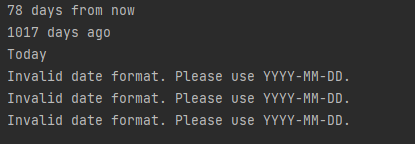
2. Working with APIs
 import datetime


# import requests  # Keep import but comment out (original API request dependency)

def process_events():
    # Preserve the original API request code but comment it out (as required)
    # response = requests.get("https://api.example.com/events")
    # events = response.json()

    # Mock data with FUTURE dates (updated to 2025 to ensure they’re upcoming)
    mock_api_response = {
        "events": [
            {
                "id": 1,
                "title": "Tech Conference 2025",
                "date": "2025-05-15T09:00:00",  # Future: May 15, 2025
                "location": "Convention Center"
            },
            {
                "id": 2,
                "title": "Summer Music Festival",
                "date": "2025-07-20T16:30:00",  # Future: July 20, 2025
                "location": "Central Park"
            },
            {
                "id": 3,
                "title": "Workshop: Advanced Python",
                "date": "2025-03-10T14:00:00",  # Future: March 10, 2025
                "location": "Community Center"
            },
            {
                "id": 4,
                "title": "New Year's Eve Party 2025",
                "date": "2025-12-31T21:00:00",  # Future: Dec 31, 2025
                "location": "Downtown Venue"
            },
            {
                "id": 5,
                "title": "Tech Book Launch",
                "date": "2025-04-05T18:00:00",  # Future: April 5, 2025
                "location": "City Library"
            }
        ]
    }

    # Extract events from mock data
    events = mock_api_response["events"]
    formatted_events = []
    now = datetime.datetime.now()  # Get current time

    for event in events:
        try:
            # Convert string date to datetime object (matches "YYYY-MM-DDTHH:MM:SS" format)
            event_date = datetime.datetime.strptime(event['date'], "%Y-%m-%dT%H:%M:%S")

            # Only keep events that are in the future
            if event_date > now:
                # Format date to a human-readable string (e.g., "Monday, May 15 at 09:00 AM")
                formatted_date = event_date.strftime("%A, %B %d at %I:%M %p")
                formatted_events.append({
                    'title': event['title'],
                    'date': formatted_date,
                    'location': event.get('location', 'TBD')  # Default to "TBD" if location is missing
                })

        except KeyError as e:
            print(f"Skipping invalid event - missing field: {e}")  # Catch missing fields (e.g., no "title")
        except ValueError:
            print(f"Skipping event with invalid date format: {event.get('date')}")  # Catch bad date strings

    # Sort events by date (earliest first)
    formatted_events.sort(key=lambda x: datetime.datetime.strptime(
        x['date'], "%A, %B %d at %I:%M %p"
    ))

    return formatted_events


# Example usage (run when the script is executed directly)
if __name__ == "__main__":
    upcoming_events = process_events()

    # Display results
    if upcoming_events:
        print("Upcoming Events:")
        for i, event in enumerate(upcoming_events, 1):  # Number events (1, 2, 3...)
            print(f"{i}. {event['title']}")
            print(f"   Date: {event['date']}")
            print(f"   Location: {event['location']}\n")
    else:
        print("No upcoming events found.")  # Only appears if all mock dates are in the past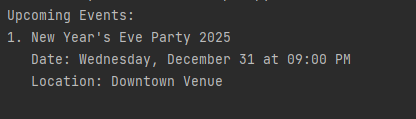
3. Data Analysis
import csv
from collections import defaultdict

# Analyze sales data by month
monthly_sales = defaultdict(float)

with open('sales_data.csv', 'r') as file:
    reader = csv.DictReader(file)
    for row in reader:
        # Convert string date to datetime object
        sale_date = datetime.strptime(row['date'], "%m/%d/%Y")

        # Extract year and month
        month_key = sale_date.strftime("%Y-%m")

        # Add to monthly total
        monthly_sales[month_key] += float(row['amount'])

# Print results
for month, total in sorted(monthly_sales.items()):
    print(f"{month}: ${total:.2f}")
Here is the sales_data.csv sample data that matches this code, containing sales records for different months:
date,amount
01/05/2023,150.50
01/15/2023,200.00
02/03/2023,75.25
02/18/2023,300.75
03/10/2023,120.00
03/22/2023,180.30
04/01/2023,450.00
04/15/2023,99.99
01/08/2024,220.50
02/12/2024,175.30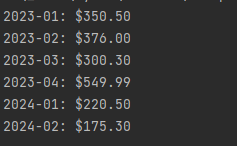
Common Pitfalls to Avoid
- Mixing up month and day: Remember that %m is month and %d is day, which is especially important when working with formats like MM/DD/YYYY vs DD/MM/YYYY.
- Case sensitivity: Format codes are case-sensitive. %Y (four-digit year) is different from %y (two-digit year).
- Time zones: The basic datetime module doesn't handle time zones. For that, you'll need to use the
pytzlibrary or Python 3.9+'szoneinfo. - Locale issues: Month and weekday names depend on your system's locale settings, which can cause unexpected behavior.
Advanced: Using dateutil for Flexible Parsing
For more complex scenarios where date formats might vary, the dateutil library offers a powerful parser that can often guess the correct format:
# First install with: pip install python-dateutil
from dateutil import parser

# This works with many different formats
date_strings = [
    "October 5, 2023",
    "2023-10-05",
    "10/05/2023",
    "5th Oct 2023",
    "2023-10-05T14:30:00"
]

for date_str in date_strings:
    dt = parser.parse(date_str)
    print(f"'{date_str}' -> {dt}")
Output:
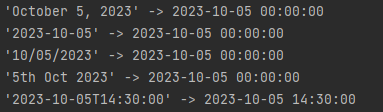
While convenient, keep in mind that this flexibility comes with a performance cost and can sometimes guess incorrectly, especially with ambiguous formats like "05/10/2023".
Summary
Converting between strings and datetime objects is a fundamental skill in Python programming. Here's what we've covered:
- Use
datetime.strptime()to convert strings to datetime objects, specifying the correct format code - Use
datetime.strftime()to convert datetime objects back to strings, with your desired format - Handle errors with try-except blocks to catch format mismatches
- Be mindful of different date formats and potential ambiguities
- For flexible parsing, consider using the
dateutillibrary
Practice with different date formats, and soon these conversions will become second nature. The key is to remember that strings are for humans to read, while datetime objects are for computers to calculate with.